Supabase Pricing Explained: What Your App Will Cost
On this page
Supabase pricing explained: what the Free, Pro and Team plans include, how compute and usage add to the bill, and what a real app costs a month.
Supabase pricing starts at $0 on the Free plan, and most apps in production move to the Pro plan at $25 a month per organization. That $25 includes $10 of compute credit, which pays for one small project. The bill then grows with each extra project, a bigger database server, usage above the included quotas and any paid add-ons such as point-in-time recovery.
This guide is for founders and small teams running an app on Supabase, including apps built with Lovable or Bolt, who want to know what the invoice will say before it arrives. It covers the plans, how a Pro bill is built, worked examples for three stages of an app, the spend cap and the charges that catch teams out. Every price comes from Supabase's pricing page and billing documentation as of October 2026.
Key takeaways
- The Free plan allows two active projects and pauses a project after one week without activity. Keep it for prototypes and demos.
- Pro costs $25 a month per organization and includes $10 of compute credit, enough for one project on the Micro size.
- Every extra project adds its own compute charge, starting at about $10 a month.
- Monthly active users above 100,000 cost $0.00325 each, and a spike in sign-ups can make them the largest line on the bill.
- The spend cap blocks charges for usage above your quotas. Compute, point-in-time recovery and other add-ons are billed in full with the cap on.
How much does Supabase cost?
Supabase has four plans: Free at $0, Pro from $25 a month, Team from $599 a month and Enterprise on custom pricing. Supabase sends one bill per organization. Each organization has one plan, one payment method and one invoice, however many projects it holds.
| Plan | Price | Database | Egress included | Backups | Fits |
|---|---|---|---|---|---|
| Free | $0 | 500 MB | 5 GB | Not listed | Prototypes, demos, side projects |
| Pro | From $25/month | 8 GB disk per project | 250 GB | 7 days | Apps with paying users |
| Team | From $599/month | As Pro | As Pro | 14 days | Companies that need SOC 2 or ISO 27001 reports |
| Enterprise | Custom | Custom | Custom | Custom | Large contracts with specific terms |
What does the Supabase Free plan include?
The Free plan gives you a 500 MB database, 5 GB of egress, 1 GB of file storage and 50,000 monthly active users, on the smallest compute size, called Nano. Two limits rule it out for a live product. You get two active projects, and Supabase pauses a free project after one week without activity. A paused project stops answering requests, so the app breaks for every visitor until someone restores it.
Build and test on Free. Move to Pro before you take payments or invite customers.
How a Supabase Pro bill is built
A Pro invoice has four parts: the $25 plan fee, compute for each project, usage above the included quotas, and any add-ons you switch on.
Compute: one charge for every project
Each project runs its own Postgres server, and Supabase charges for that server by the hour, busy or idle. Pro includes $10 a month of compute credit, which pays for one project on the Micro size. A second project, such as a staging copy of your app, adds at least another $10.
| Compute size | Memory | CPU | Direct connections | Price a month |
|---|---|---|---|---|
| Micro | 1 GB | Shared | 60 | About $10 |
| Small | 2 GB | Shared | 90 | About $15 |
| Medium | 4 GB | Shared | 120 | About $60 |
| Large | 8 GB | 2 dedicated vCPUs | 160 | About $110 |
| XL | 16 GB | 4 dedicated vCPUs | 240 | About $210 |
Sizes continue up to 16XL at about $3,730 a month. Our guide to scaling Supabase with connection pooling, indexes and the right compute size covers when a bigger server pays for itself and when an index does the same job for free.
Usage above the included quotas
Pro includes a quota for each usage item. Above the quota you pay per unit, and the quota covers your whole organization, so two projects share one 250 GB egress allowance.
| Usage item | Included in Pro | Price above the quota |
|---|---|---|
| Egress (data sent to clients) | 250 GB | $0.09 per GB |
| Cached egress (served from the CDN) | 250 GB | $0.03 per GB |
| File storage | 100 GB | $0.0213 per GB |
| Database disk | 8 GB per project | $0.125 per GB |
| Monthly active users | 100,000 | $0.00325 per user |
| Edge Function invocations | 2 million | $2 per million |
| Realtime messages | 5 million | $2.50 per million |
| Realtime concurrent connections | 500 | $10 per 1,000 |
Egress covers every byte Supabase sends out: database query results, files from storage, Auth responses, Edge Function responses and realtime events, according to the egress documentation.
Add-ons
- Point-in-time recovery: $100 a month for each 7 days of retention. It lets you restore the database to any minute, on top of the daily backups Pro keeps for 7 days.
- Custom domain: $10 a month per project, so your API runs on your own domain instead of a supabase.co address.
- Log drains: $60 a month per drain, plus $0.20 per million events and $0.09 per GB of egress.
The Team plan adds SOC 2 and ISO 27001 reports, 14-day backups and 28-day log retention for $599 a month. Consider it when a customer's security review asks for those reports.
What does a Supabase app cost each month?
Three worked examples, using the October 2026 prices above.
A launched MVP: $25 a month
One production project on Micro, a few thousand users and well under 250 GB of egress. The $10 compute credit covers Micro and usage stays inside the quotas, so the invoice shows the $25 plan fee.
A production app with staging: $50 a month
Production on Small ($15), a staging project on Micro ($10) and a custom domain on production ($10). Compute comes to $25, the credit takes off $10, and the total is $25 + $15 + $10 = $50.
A growing app: about $350 a month
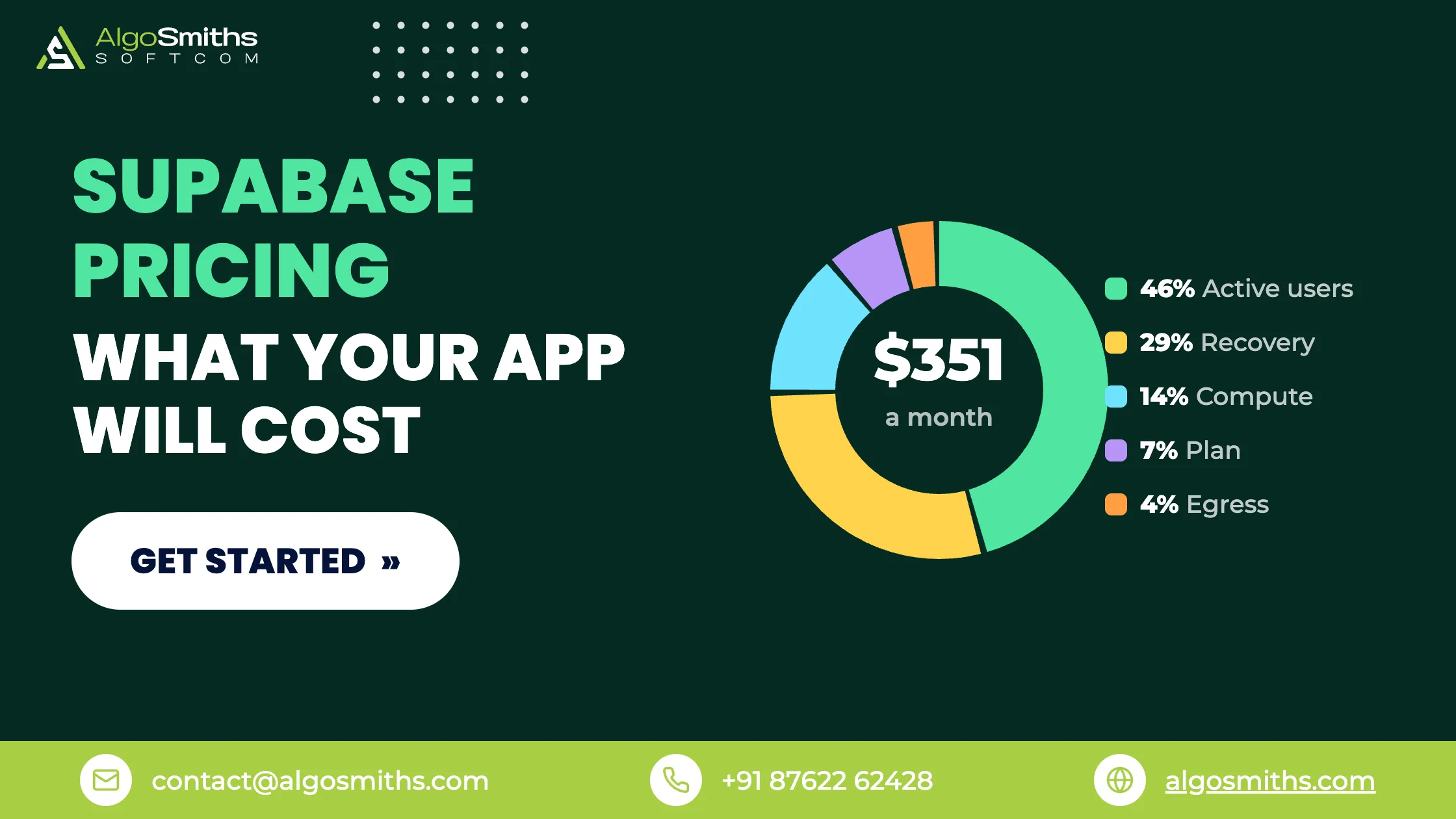
Production on Medium, 150,000 monthly active users, 400 GB of egress and seven days of point-in-time recovery.
| Line | Calculation | Cost |
|---|---|---|
| Pro plan | Flat fee | $25.00 |
| Compute | Medium $60 minus $10 credit | $50.00 |
| Monthly active users | 50,000 over quota × $0.00325 | $162.50 |
| Egress | 150 GB over quota × $0.09 | $13.50 |
| Point-in-time recovery | 7 days | $100.00 |
| Total | $351.00 |
Monthly active users make up almost half of that bill. A sign-up form that bots can reach pushes that number up, and you pay for every fake account that signs in.
The Supabase spend cap: what it covers and what it leaves out
The spend cap is a Pro plan setting, on by default, that stops charges for usage above your quotas. With the cap on, Supabase blocks further use of an item once its quota runs out and lifts the block at the start of the next billing cycle, as the cost control documentation explains.
The cap covers usage items such as egress, disk size, Edge Function invocations, monthly active users, realtime messages and storage. It excludes the items you switch on yourself: compute, custom domains, IPv4 addresses, log drains, phone-based multi-factor authentication and point-in-time recovery. Those bill in full with the cap on.
Keep the cap on while you build. Before a launch or a marketing push, decide which you would rather have when a quota runs out: a larger invoice or parts of the app that stop working. Then set the cap to match.
Where Supabase bills surprise founders
Every project adds compute
Staging copies, old experiments and preview branches each run their own server and each cost compute by the hour. Open the projects list once a month and pause or delete the ones nobody uses.
Queries that send more data than the screen needs
A select * on a wide table sends every column to every visitor, and all of it counts as egress. Ask for the columns the page shows, cache data that changes once a day or less, and serve images and files through the CDN, where cached egress costs $0.03 per GB against $0.09.
Monthly active users from bots
An open sign-up form with no CAPTCHA and no email confirmation lets scripts create accounts, and each account that signs in counts as an active user. Turn on CAPTCHA for sign-ups and require email confirmation before the first login.
Point-in-time recovery you may not need
At $100 a month, point-in-time recovery can cost more than the rest of a small app's bill. Pro already keeps daily backups for 7 days. Add point-in-time recovery when losing a day of data would hurt customers or revenue.
Frequently asked questions
Is the Supabase Free plan enough for a production app?
For a live product, no. Free projects pause after a week without activity and the database stops at 500 MB. Move to Pro before real customers depend on the app.
Does Supabase Pro cost $25 per project?
No. Pro costs $25 per organization. Each project then adds its own compute charge, and the included $10 credit covers one project on the Micro size, so a second Micro project adds about $10 a month.
Can I set a budget limit on Supabase?
The spend cap is the main control. It blocks usage overages, but Supabase's documentation says it does not support budgets for individual usage items or alerts when a cost is reached. Check the usage page in the dashboard each week during a launch.
Is Supabase cheaper than Firebase?
It depends on how your app reads data. Firebase's Firestore bills per document read and write, while Supabase bills for servers, data transfer and active users. Our Supabase vs Firebase comparison walks through both pricing models for an MVP.
How can I lower my Supabase bill?
Delete or pause projects nobody uses, pick the smallest compute size that handles your load, fetch the columns each screen needs, serve files through the CDN and block bot sign-ups.
Before your next Supabase invoice
Open the usage page in your Supabase dashboard and compare monthly active users and egress with the Pro quotas. Then list your projects and remove the ones nobody needs.
If your app was built with an AI tool and you want a senior engineer to review its database, access rules and running costs before launch, our service for fixing and launching AI-built apps starts with a $149 launch-readiness review.
Topic: AI-built apps & Supabase